NorthPublisher
Libre Translate
Official Documentation
PRO upgrades are managed securely inside the plugin via Freemius.
Welcome to NorthPublisher Libre Translate
This revolutionary WordPress plugin allows you to offer instant, unlimited translations of your website using the open-source LibreTranslate engine. Say goodbye to monthly API subscriptions, strict rate limits, and per-word billing structures that punish your business for growing.
The plugin is available in two tiers: a robust FREE version for basic sites, and a powerful PRO version designed to handle high-traffic environments, massive WooCommerce catalogs, and dynamic content injection.
PRO unlocks crucial features for serious websites: SEO Subdomains for global indexing, a Resumable Bulk Preloader for instant load times, and ultra-fast JSON File Caching. Both versions feature true Live DOM Swapping to preserve your original HTML structure.
Phase 1: Running Your Private Translation Server
To use this plugin without restrictions, you connect it to a LibreTranslate API endpoint. You can host this yourself for free on a VPS.
For PRO users, a fully-managed, high-performance premium LibreTranslate Server (translate.libre-server.com) is integrated straight out of the box! You can activate it instantly using your license key, completely eliminating the need to set up or maintain your own server infrastructure.
Alternatively, if you choose to self-host, we recommend a server running Ubuntu 20.04 or 22.04 LTS. We will bind the server to your local loopback interface for security.
- Access your server via SSH terminal using a client like PuTTY or Terminal (macOS), logging in as the
rootuser. - Install Docker Environment: If you don't have Docker installed, run the official installation script:
curl -fsSL https://get.docker.com | sh systemctl enable docker systemctl start docker - Deploy the Engine: Execute the command below.
Crucial Performance Tip: SetLT_THREADSbased on your available CPU threads (e.g., if your server has 16 threads, use 12, leaving some for OS overhead). Adjust the--load-onlyargument to include only the languages you need to save RAM. Add-e PYTHONWARNINGS="ignore"to keep logs clean.docker run -d -p 127.0.0.1:5000:5000 \ --name libretranslate_engine \ --restart unless-stopped \ -e LT_THREADS=4 \ -e PYTHONWARNINGS="ignore" \ libretranslate/libretranslate \ --disable-web-ui \ --load-only en,de,it,fr,es - Configure the Reverse Proxy: In your hosting panel, create a subdomain (e.g.,
api.yoursite.com). Set up an Nginx/Apache Reverse Proxy to route incoming HTTPS traffic to your internal Docker container running onhttp://127.0.0.1:5000. - Secure with SSL: Ensure you generate a valid Let's Encrypt SSL certificate. The WordPress plugin requires a secure
https://connection.
Phase 2: Plugin Installation & Configuration
With your API engine deployed (or a third-party API ready), connect it to your WordPress installation.
- Go to Plugins -> Add New -> Upload Plugin. Upload the provided `.zip` archive and activate the plugin.
- Navigate to Settings -> Libre Translate.
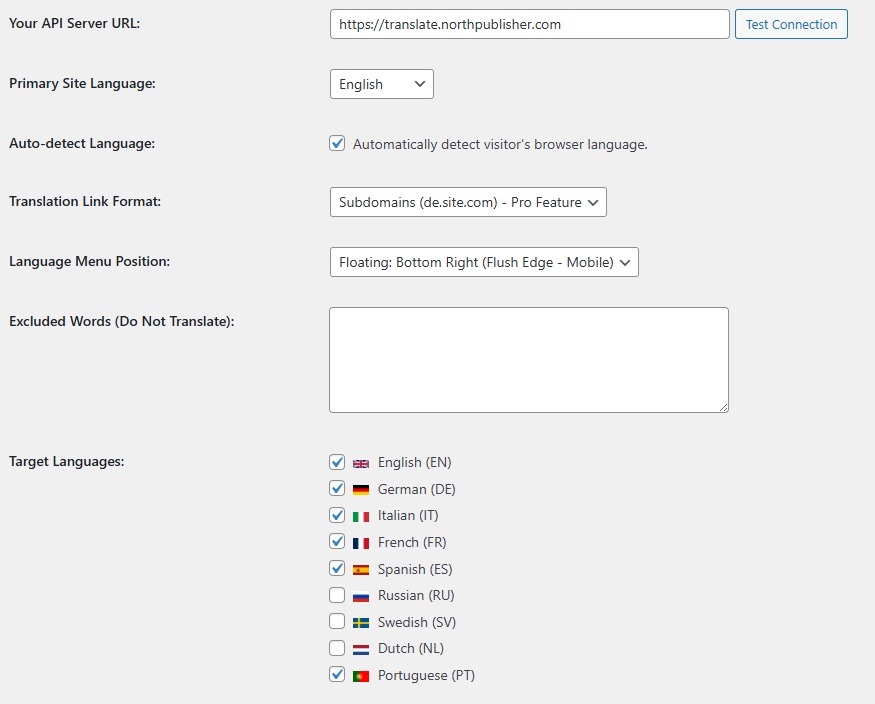
- In the API Server URL field, enter the full URL of your API (e.g.,
https://api.yoursite.com). Do not include a trailing slash. - If your server requires an API Key, enter it here. (If a key is saved, requests securely route through WordPress's
admin-ajax.phpproxy, so the key is never exposed). - Translation Transport: FREE users default to the WP proxy for reliability. Developers can enable direct browser translation via the
nlt_free_use_browser_translatefilter. - Click Test Connection. A green message confirms WordPress can reach the engine.
- Select your Primary Language and check the target languages.
- Configure the floating language switcher and Excluded Words (protect brand names from translation), then click Save Changes.
Phase 3: Caching & Bulk Preloader PRO
Real-time DOM translation is fast, but fetching from the API repeatedly is inefficient. PRO unlocks enterprise caching and preloading for ultimate performance.
1. Server Translation Cache
Enable the cache to store translated strings. In the PRO version, you should select JSON files (recommended). This stores the cache directly on your disk (in wp-content/uploads), bypassing the database entirely for blazing-fast retrieval.
2. The Resumable Bulk Cache Preloader
Don't wait for visitors to generate the cache. The PRO preloader automatically crawls your sitemap and translates pages in the background. This is the key to unlocking peak performance.
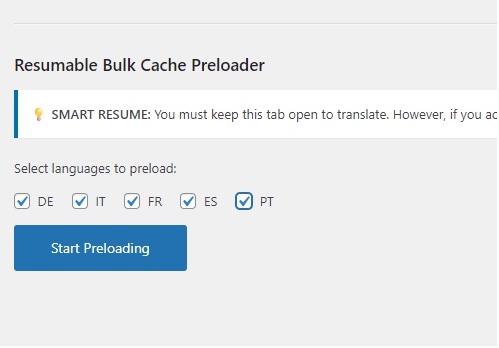
- Scroll to the "Bulk Cache Preloader" section.
- Select the languages to preload.
- Click Start Preloading.
The preloader uses Smart Resume—if you lose connection, it remembers its exact place. Additionally, if you are on shared hosting (using Conservative throughput), you can use the Pop-out preloader window. This dedicated runner allows you to close the main settings tab while the preloader safely processes massive queues in an isolated window to prevent timeouts.
Phase 4: SEO Subdomains & Slugs PRO
The FREE version uses URL parameters (?lang=de). To rank globally on search engines, Subdomain Routing is crucial. PRO provides a native, SEO-optimized structure (e.g., de.yoursite.com).
- Configure Wildcard DNS: Add a Wildcard A Record (Name:
*, Value: Your Server IP) in your DNS manager (e.g., Cloudflare). - Hosting Setup: Ensure your hosting panel routes these subdomains to your main WordPress installation (e.g., Domain Alias without 301 redirection).
- Enable Subdomain Mode: In plugin settings, change "Translation Link Format" to Subdomain. The plugin's built-in URL Rewriter handles internal links automatically.
- Enable SEO Translated URLs & Titles: Turn this ON to generate native slugs for Posts, Pages, and Products.
The plugin automatically handles:- Canonical Alignment: 301 redirects for incorrect language/slug mismatches.
- Hreflang Tags: Injects
hreflangandx-defaultlinks in the header. (Note: Avoid duplicating hreflang generation with other SEO plugins to prevent conflicts). - Translates
<title>andog:titleautomatically.
Subdomain First-Load Speed Mode: Ensure this is enabled in PRO. It skips initial dictionary warm-up routines on the first hit, resulting in significantly faster "first paint" times for visitors entering via subdomains.
Phase 5: Performance Tuning
Fine-tune the engine's behavior based on your hosting environment.
- Shared Hosting Mode Uses smaller API batches (25 strings instead of 100). Essential for cPanel/shared hosting to prevent 504 timeouts and memory exhaustion.
- Translation Throughput Controls batch sizes and parallelism. Choose Conservative (weak hosting), Balanced (default), or Aggressive (strong VPS).
- Translation Intensity Multiplies the batch sizes. Options: Normal, Turbo, Max. Warning: Combining Turbo/Max with Shared Hosting Mode can cause severe CPU spikes and API throttling.
- Preloader Throttle PRO Adjust the speed (Fast, Normal, Slow) of the Bulk Preloader to prevent overwhelming your server during massive background jobs.
Phase 6: WooCommerce Ready
WooCommerce injects content dynamically via AJAX (cart updates, infinite scroll). Standard plugins often enter infinite translation loops here. NorthPublisher Libre Translate uses an intelligent MutationObserver to handle this gracefully.
Advanced Observer Tuning PRO
PRO unlocks crucial controls to prevent API churn on heavy eCommerce sites:
- Observer Cooldown (ms): Enforces a mandatory pause (e.g., 3000ms) after a translation pass completes before allowing a new one, preventing rapid-fire loops on product pages.
- Observer Min Segments: Forces the plugin to wait until a minimum number of new text strings (e.g., 12) are detected before calling the API, reducing tiny, wasteful API bursts.
- Skip Noisy Dynamic Blocks: Automatically ignores high-churn, low-value dynamic mounts (like login modals or Google Pay widgets) where translation ROI is low but server impact is high.
Note: The plugin automatically pauses the MutationObserver while a translation run is in progress to avoid feedback loops.
Phase 7: Debugging & Tools
If translations aren't working as expected, use the built-in tools.
- Frontend Debug Mode: Append
?nlt_debug=1to any URL to open the floating Debug Panel and view Console logs. - Admin Tools Tab: Use the "Open Debug on any URL" feature to quickly test specific pages.
- Test Connection: Use the button in Settings to verify API reachability.
- Ensure the API URL is valid (no trailing slashes).
- Check server logs and ensure Firewalls/CORS aren't blocking requests.
- Purge CDN (Cloudflare) or caching plugins to ensure old JS files aren't lingering.
- If the preloader fails on large sites, set Throughput to Conservative and use the Pop-out Runner.
Libre Translate
Fast, SEO-Optimized Engine
PRO upgrades are managed securely inside the plugin via Freemius.
📖 Read DocumentationAutomated WP Translation. Reimagined.
NorthPublisher Libre Translate connects your website to the powerful, privacy-first LibreTranslate engine. Stop bloating your database with traditional multilingual plugins. Translate the DOM in real-time, scale your WooCommerce store, and conquer international SEO without monthly word-count fees.
Explore Core Capabilities
Choose Your Tier
Start for free on smaller blogs, or upgrade to PRO inside the plugin to unlock peak performance preloading, WooCommerce stability, and enterprise SEO capabilities.
Basic Edition
Perfect for smaller sites wanting a fast start with automated translations and no complex setup.
- ✅ Real-time frontend translation engine
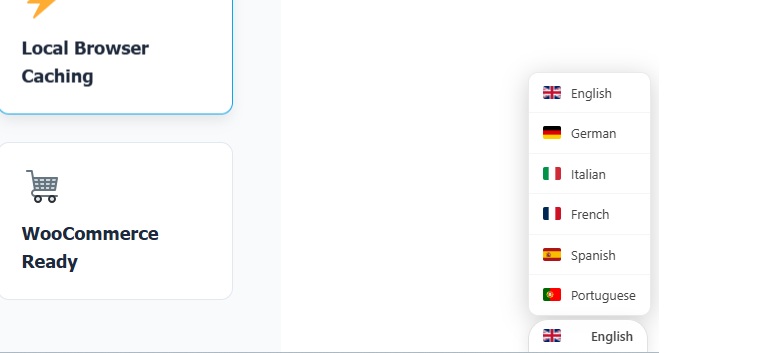
- ✅ Floating language switcher (9 languages)
- ✅ URL parameter mode (e.g.,
?lang=es) - ✅ WordPress proxy fallback for stability
- ✅ Local browser caching
- ✅ Basic Performance tuning (Throughput & Intensity)
- ✅ Built-in Debug mode for diagnostics
- ❌ Requires self-hosted engine or manual API key
Professional Edition
Unlock ultimate speed and indexing. Built for production sites, Woo stores, and SEO-driven projects.
- ➕ Everything in Free, plus:
- ⭐ Managed Server Access Included: Instant connection to
translate.libre-server.comusing your license key. No server setup required! - ⚡ Peak Performance Preloader: Translate the entire site in the background for zero-wait load times.
- 🌍 Crucial SEO Subdomains: Route users to native domains (e.g.
fr.site.com). Mandatory for global Google indexing. - 🔍 Translated SEO Slugs: Auto-translates URLs & meta titles.
- 🗄️ JSON Dictionary Cache: Ultra-fast disk cache in WP uploads folder.
- 🛒 WooCommerce Tools: Advanced observers, cooldowns, and churn protection.
Peak Performance Tuning
Achieving top-tier speed requires the right tools. PRO unlocks the ultimate performance combination: The Bulk Preloader and JSON caching.
🚀 The Ultimate Speed Unlock: Resumable Bulk Preloader (PRO)
Don't make your visitors wait for real-time API calls. The PRO preloader is the cornerstone of top-tier performance. It automatically crawls your sitemap and translates your pages in the background. By the time a user visits, the translations are already waiting in a blazing-fast JSON file cache, resulting in 0.1ms load times.
Shared Hosting Mode
Uses smaller, safer API batches (25 strings instead of 100) to drastically reduce memory usage and prevent 504 Gateway Timeouts on limited cPanel/shared hosting.
Available in Free & PROTranslation Throughput
Controls the base size and frequency of API calls. Choose Conservative for weak hosting, Balanced for typical setups, or Aggressive for strong VPS environments.
Available in Free & PRORecommended Settings by Environment
| Hosting Type | Shared Mode | Throughput | Intensity |
|---|---|---|---|
| Standard Shared Hosting | ON | Conservative | Normal |
| Mid-Range VPS (2-4 Cores) | OFF | Balanced | Normal / Turbo |
| High-End Dedicated (8+ Cores) | OFF | Aggressive | Turbo / Max |
SEO & WooCommerce Mastery PRO
Translating standard blogs is easy. Translating dynamic eCommerce stores and making them rank globally requires advanced architecture.
🌍 Crucial for SEO: Subdomains & Native Slugs
Search engines demand dedicated, localized URLs to index your content properly. URL parameters (?lang=es) are not enough for serious ranking. PRO unlocks Subdomain Routing (e.g., es.yourstore.com) and natively translates your URL slugs.
- Canonical Alignment: Strict 301 redirects ensure search engines always land on the correct language URL.
- Hreflang Tags: Automatically injects
hreflangandx-defaultlinks into the header for perfect international targeting. - First-Load Speed: Fast Subdomain Paint mode bypasses initial dictionary warmups for instant navigation.
Note: Do not use other SEO plugins to duplicate hreflang tags while this feature is active to avoid conflicts.
🛒 Dynamic WooCommerce Protection
Modern Woo themes inject text via AJAX (cart drawers, popups, variations) long after the page loads. Our Vanilla JS MutationObserver catches and translates these instantly. To prevent infinite API loops, PRO adds:
- Observer Cooldown: Forces a pause (e.g., 3000ms) between translation passes.
- Min Segments: Waits until a minimum number of new text strings are detected before hitting the API.
- Skip Noisy Blocks: Ignores high-churn elements (login modals, Google Pay widgets) where ROI is low but server impact is high.
Stop Paying Per Word
Let's look at the real cost of translating a WooCommerce store (approx. 50,000 words) over one year.
12-Month Projected Translation Costs
| Solution | Approach / Tech | Estimated 1-Year Cost |
|---|---|---|
| Weglot (Pro Plan) | Cloud / SaaS API | ~$590 / year (Recurring) |
| WPML (Multilingual CMS) | Database Row Duplication | $99 / year (+ DB Hosting) |
| Libre Translate PRO | Frontend DOM + Managed Server API | $39.95 / year |
translate.libre-server.com API infrastructure via their license key, eliminating VPS upkeep entirely.
Troubleshooting & FAQ
Built-in developer tools and answers to common setup questions.
🛠️ Developer Debug Tools
If translations aren't appearing, use the built-in diagnostic tools:
- Append
?nlt_debug=1to any frontend URL to open the floating Debug Panel and Console logger. - In the WP Admin, navigate to the Tools tab and use the "Open Debug on any URL" feature.
- Use the Test API Connection button in Settings to verify your LibreTranslate server is reachable.
Common Fixes: Check for valid API URLs (no trailing slashes), ensure your firewall isn't blocking CORS requests, and purge your CDN cache (Cloudflare/LiteSpeed) if old JS files are lingering.
Ready to deploy your API?
Read our comprehensive documentation on how to link your API and maximize performance.
Read Full Manual


